A product question
Can I keep voice local and still make it useful in daily work?
Diary | Local AI Experiment
A personal builder diary on creating a local first Mac dictation and voice coaching prototype with Codex, Claude Code, WhisperKit, LM Studio, and local learning.
I keep experimenting. But this is not experimentation for its own sake. We are living through a time when artificial intelligence is evolving so quickly that no one can fully know in advance where it will settle.
That raises a practical question for me: how do I keep myself upskilled in such a stage? Training matters. Reading, courses, talks, and demos all help. But I have also realized that training can remain passive unless I force myself to build, test, and use these systems in real situations.
So I am trying to build more: with Codex, Claude Code, local agents, local models, and small product experiments that touch my own daily work. While building, I am also trying to deduce the world around these tools: what is real, what is fragile, what is powerful, what is risky, and what may become normal.
Momo is one such effort: part product experiment, part coding diary, and part learning journey. The honest way to understand this shift is to build, test, fail, improve, and keep evolving.
Build Model
Momo is not only an app screen. It is a working loop where I learn by building, test the app in real use, observe the hard parts, and keep adding what the system teaches me.
Coding Journey
Can I keep voice local and still make it useful in daily work?
Codex implements, Claude Code reviews, and I keep product judgment in the loop.
Hotkeys, audio, latency, paste behavior, and permissions reveal what actually works.
Each round becomes a note, a screenshot, a fix, or the next product decision.
Product Pipeline
Voice becomes accurate local text.
Text moves into the active app safely.
Voice can request small actions with review.
A refined local agent helps with context, memory, and execution.
Path To A Personal Agent
The long term direction is not to jump directly into a grand agent. The product has to earn trust one layer at a time. Reliable dictation comes first. Small reviewable actions come next. Only after that should it become a more capable personal assistant. Agent tools already exist in the ecosystem, but the real product challenge is making this feel refined, private, explainable, and useful in daily work.
Voice becomes accurate local text.
Text moves into the active app safely.
Voice can request small actions with review.
A refined local agent helps with context, memory, and execution.
Learning Through Doing
The real lesson is not that every experiment will become a product. The lesson is that active building creates a different kind of learning. It lets me move from passive awareness to practical judgment.
The future is not fully knowable.
Useful, but incomplete by itself.
Codex, Claude Code, local agents, local models.
Latency, privacy, UI, workflow, and trust become visible.
Understanding comes from doing, not watching alone.
Courses, talks, and reading help create vocabulary, but they can remain passive if I do not use the tools myself.
When I build with Codex, Claude Code, local agents, and local models, I see the actual limits, tradeoffs, and possibilities.
Real use shows what breaks: latency, UI clarity, permissions, model quality, and whether the idea is genuinely useful.
The world is moving fast, so the learning loop must also keep moving: build, observe, question, improve, and repeat.
Why Momo
Modern dictation tools are powerful. Once you get used to speaking and seeing text appear where you are typing, typing starts to feel slower.
But voice is personal. It carries words, tone, hesitation, emotion, names, habits, and context. If a dictation tool becomes part of daily work, it starts to see a very intimate layer of how one thinks.
Can I build a Mac native, local first voice assistant that lets me speak instead of type, while keeping audio and learning on my own machine?
Why Local Matters
Voice can reveal much more than the words spoken. It can carry identity-like cues, rhythm, mood, hesitation, vocabulary, names, habits, and the work context around a person. That is why I keep coming back to the local first question.
Online tools are useful, but for a personal voice layer I want to understand what can run offline or locally. The goal is not fear of technology. The goal is a more thoughtful balance: use powerful AI, but keep sensitive personal signals close to the user wherever possible.
What It Does Today
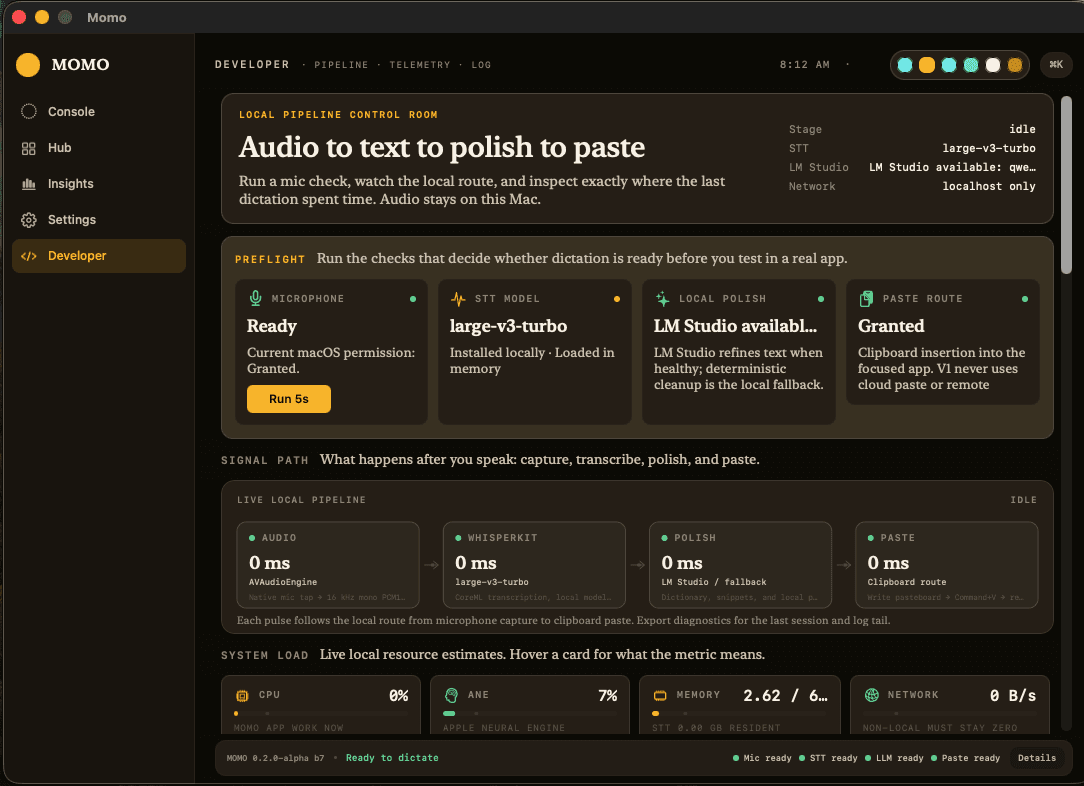
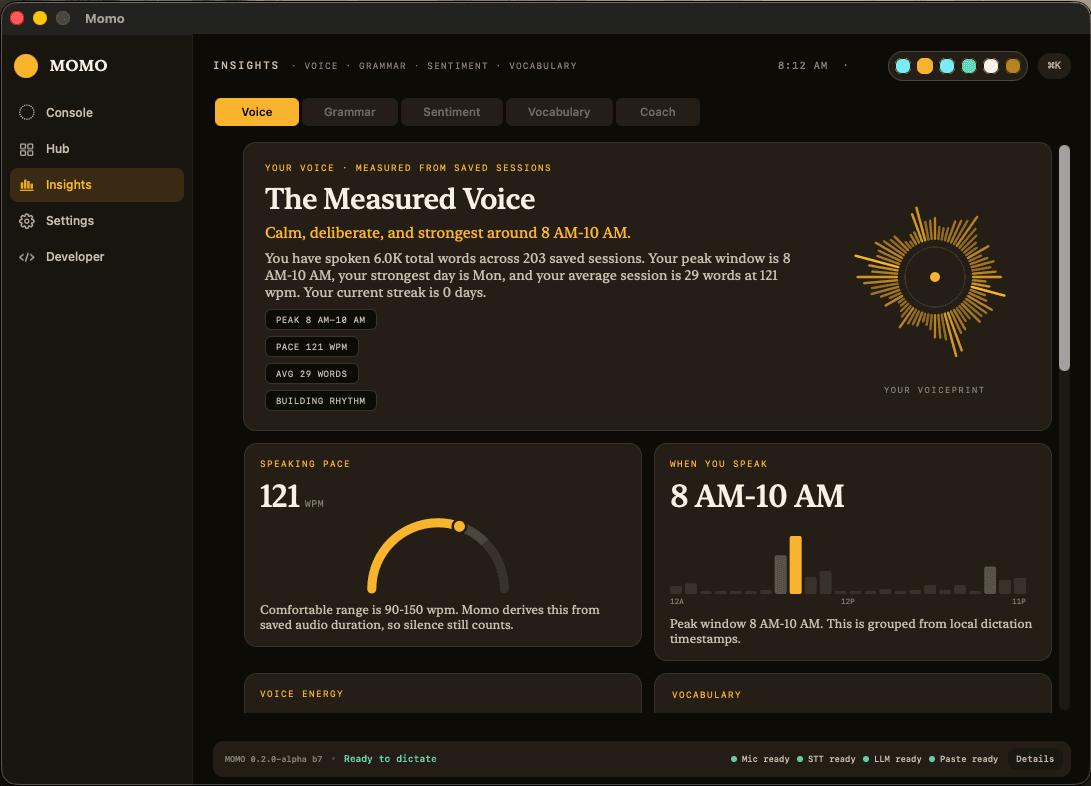
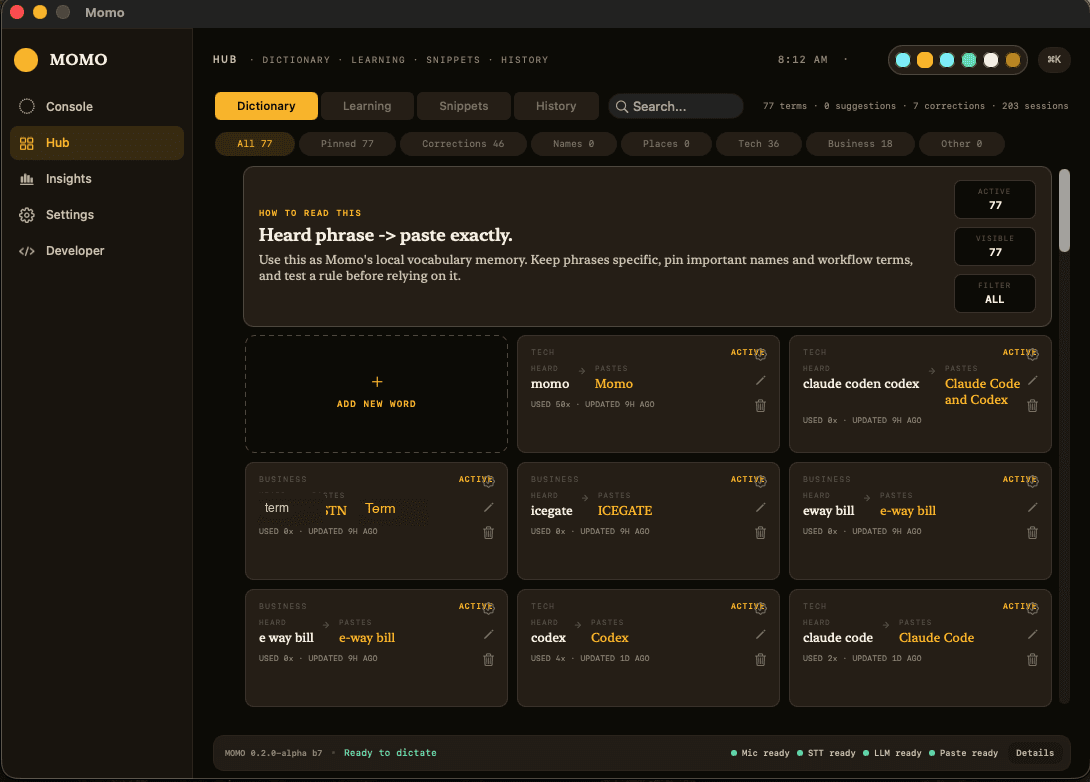
Momo also has a dashboard for dictation history, dictionary rules, local model status, latency metrics, insertion diagnostics, and early voice coaching insights. The app is not only trying to convert speech into text. It is slowly becoming a personal writing and speaking companion.
Animated Loop
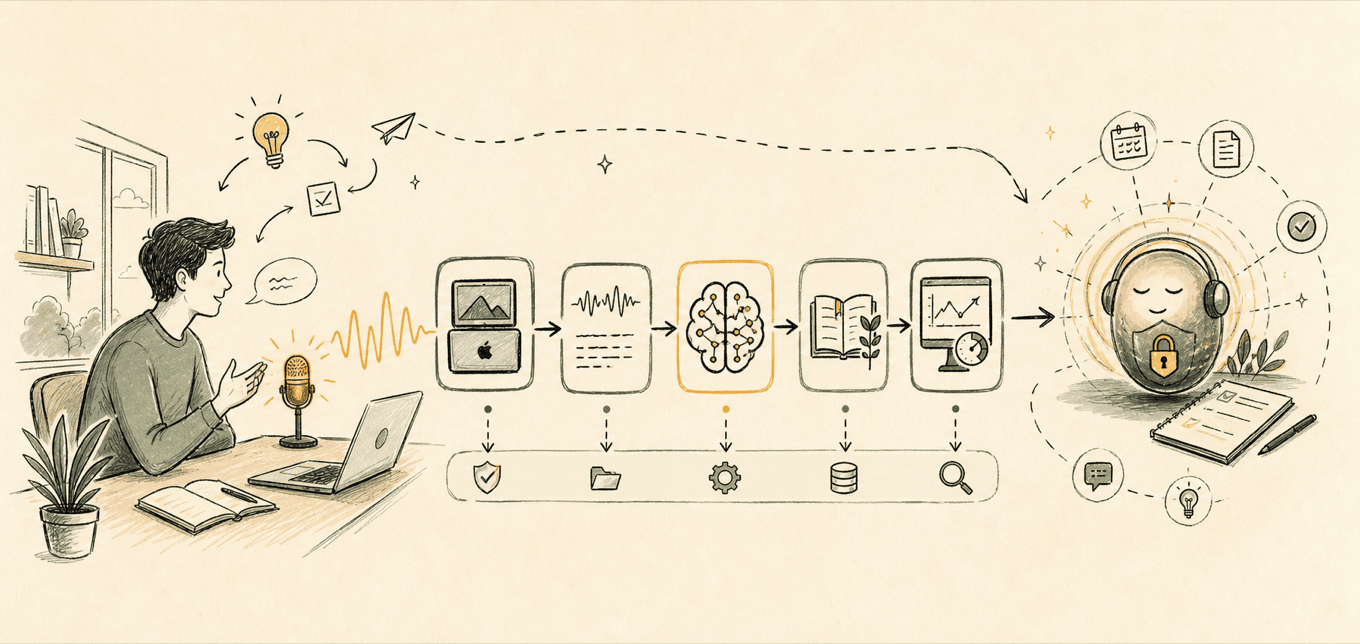
The loop below is intentionally simple, but it shows why this is an engineering project and not only a UI experiment. Each stage has to work locally, report its state, and recover when something goes wrong.
Capture starts only when I hold the shortcut.
WhisperKit turns local audio into text.
Deterministic cleanup and local model polish improve readability.
The result is inserted into the active app through a controlled route.
Dictionary rules, snippets, and insights stay visible and local.
Build History
The project did not begin as a complete product. It began as a working loop and then kept absorbing real problems: reliability, latency, interface clarity, iconography, diagnostics, and learning.
The first milestone was deliberately small: hold a shortcut, record audio, run local transcription, clean the text, and insert it into the active app.
The project then moved into the less glamorous but essential work: hotkey reliability, app bundle identity, Accessibility permissions, and paste behavior across different apps.
The floating recording state, waveform feedback, menu bar behavior, dashboard layout, and iconography started becoming part of the product judgment, not decoration.
Dictionary rules, snippets, deterministic cleanup, local LLM polish, and voice coaching ideas turned the prototype from transcription into a personal writing layer.
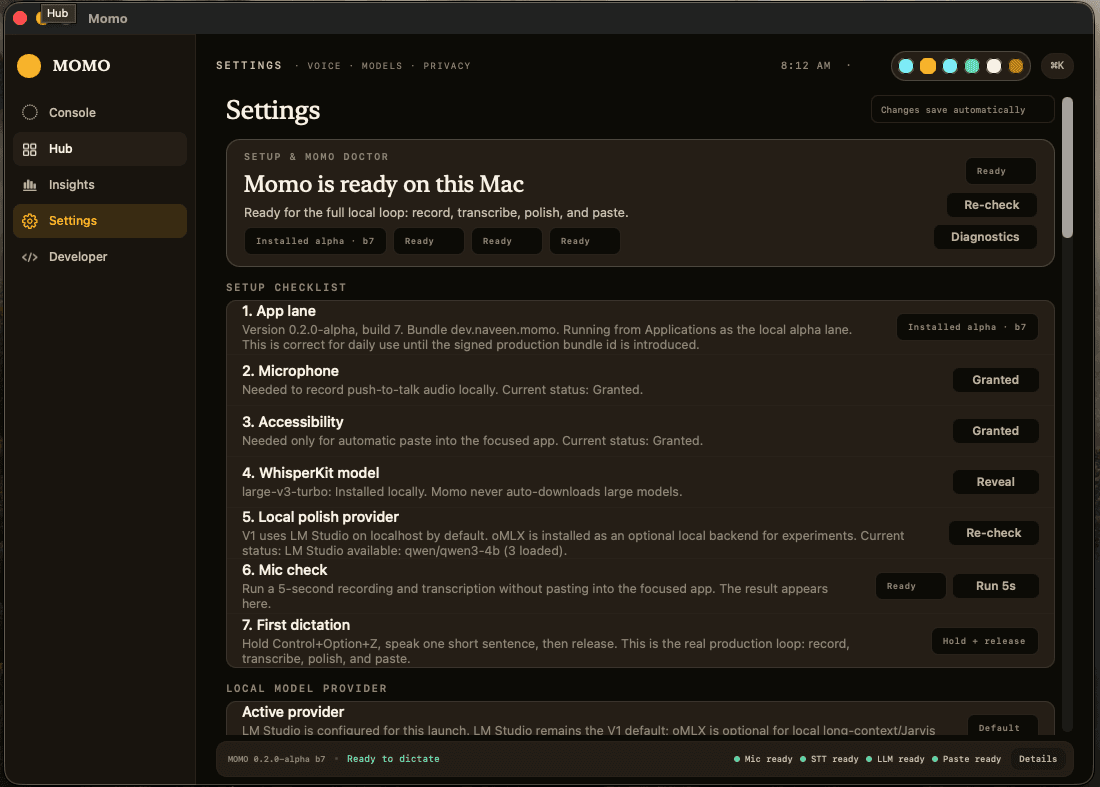
Momo Doctor, Developer diagnostics, latency by stage, model health, insertion route, and local logs became important because local first systems need to explain themselves.
Local First Architecture
The current design keeps speech to text, polish, learning, and diagnostics local. That constraint shaped almost every architectural choice.
Push-to-talk trigger
AVAudioEngine capture
Local speech to text
Cleanup, dictionary, snippets
LM Studio and Qwen polish
Clipboard insertion
Local records and rules
Diagnostics and insight
Engineering Insights
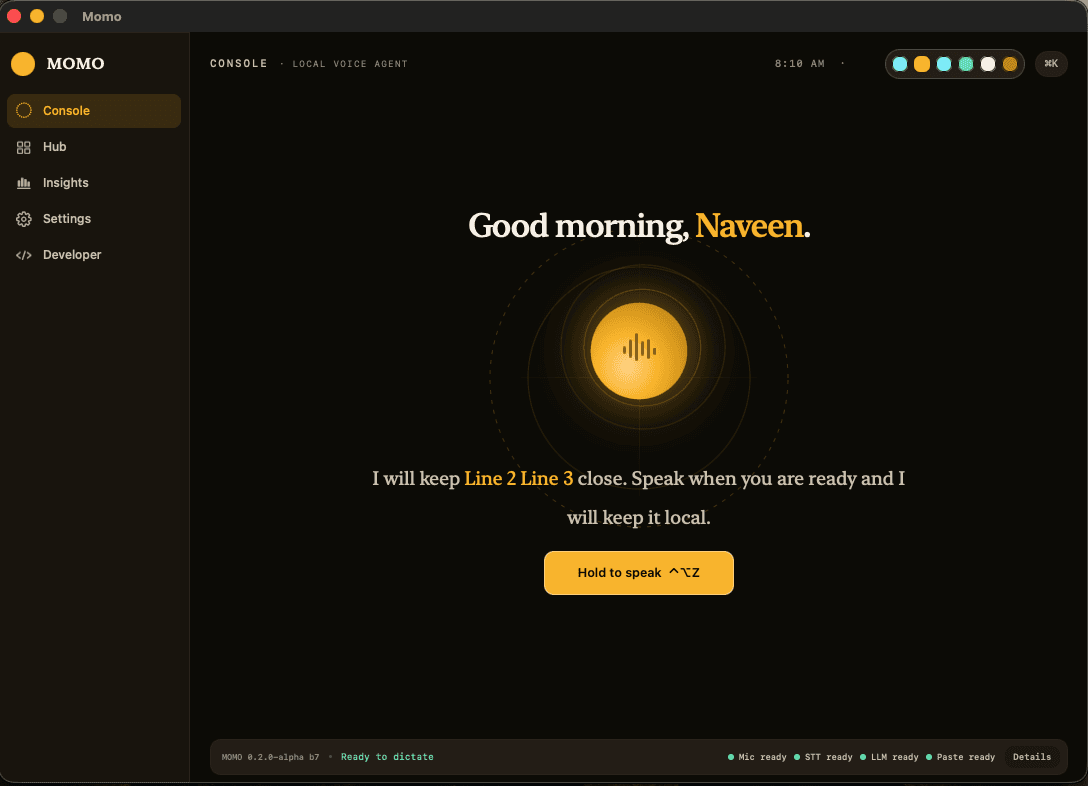
The screenshots show a polished alpha surface, but the real education came from the hidden edges: latency, permissions, vocabulary, paste behavior, and trust. These are the places where a voice idea becomes a usable system.
AI Coding Workflow
This is where the experiment became more than a dictation app. It became a way to learn the new building process itself: how to brief AI tools, how to review their work, how to keep product judgment in human hands, and how to improve by testing in real situations.
Engineering Diary
The visible app is only one part of the story. The deeper learning came from seeing where a simple idea becomes difficult in practice: latency, recording feedback, UI trust, and product identity.
The visible action is simple, but the hidden path includes audio flush, model warmup, local STT, cleanup, optional local polish, paste insertion, and diagnostics. Each stage needs measurement.
A voice product must show that it is listening, but without becoming noisy. Waveform feedback helped convert an invisible audio process into a more legible interaction.
The dashboard became a trust surface: history, dictionary, health checks, model status, latency, and insertion outcomes help the user understand the local system.
Even for an experiment, icons matter. They help separate recording, learning, diagnostics, local model status, and developer tools without making the interface wordy.
Diagnostics Mindset
A local first assistant should not hide the messy parts. If audio is not captured, if text is delayed, or if paste fails, the system should say what happened and guide the next action.
Microphone permission, wrong input device, or capture format mismatch.
Run the mic check, show current permission state, and avoid pretending the app is listening.
Model warmup, long utterance, local polish delay, or paste route delay.
Break timing into stages so the slow part is visible and can be improved.
Speech model uncertainty around personal vocabulary, acronyms, or domain terms.
Use dictionary rules and reviewable corrections rather than hiding the learning layer.
Focus moved, target app blocked paste, or accessibility route changed.
Record the insertion route and make the failure clear instead of silently losing text.
The Hard Parts
Global shortcuts on macOS are not as simple as they look. Momo moved toward a battle-tested shortcut library and a proper app bundle identity.
The capture path uses the hardware-native input format first, then converts separately to a 16 kHz mono WAV segment for WhisperKit.
The practical default is large-v3-turbo: good enough quality with local latency that can still fit into a daily workflow.
A simple user action hides many stages: audio flush, speech to text, cleanup, optional local polish, and insertion into the active app.
Different apps behave differently. V1 uses clipboard paste insertion, records outcomes, and avoids keystroke-by-keystroke injection.
Dictionary rules and learning suggestions need to stay visible, reviewable, reversible, and local.
Data Layer
Momo is not only a microphone and a model. Once the app starts remembering dictionary entries, corrections, snippets, session history, and diagnostics, the data layer becomes a design decision. A simple local JSON-style record is useful for early learning, but a more structured database can become important as the product matures.
The early learning layer can begin with simple local records because the goal is to test behavior before overbuilding infrastructure.
As sessions, dictionary entries, snippets, corrections, and diagnostics grow, the data model becomes part of the product, not only storage.
A future version can move from simple JSON style records to a more structured local database or Postgres-backed workflow if the product needs richer querying.
Trust Layer
A local AI product must help the user understand local state: model availability, permissions, target app behavior, audio health, latency, and insertion route.
That is why Momo has a Developer view, Momo Doctor, diagnostics export, and local insight cards. A magical product is good, but a trustworthy product must explain itself when something goes wrong.
Future Roadmap
Many people are now building small, personal AI systems around their own workflows. That is the direction that interests me most: tools that remain grounded in the user, respect privacy, and grow from daily use.
Make local dictation dependable: hold a shortcut, speak, transcribe locally, polish locally, and insert text where the cursor is active.
Let spoken intent trigger small, reviewable actions such as opening a note, preparing a message, searching local context, or routing a task.
Add memory, preferences, workflow context, and coaching so the assistant understands how I work without becoming careless with private data.
Move toward a polished local assistant that can coordinate tools, explain its actions, and stay under human control.
The long term imagination is a Jarvis style local assistant: not a dramatic science-fiction promise, but a practical companion that helps with speech, writing, search, context, learning, and everyday execution.
Effort Ledger
One important part of this story is the effort behind the build: prompts, reviews, tests, failed paths, debugging, rebuilds, and many rounds of judgment. AI reduced the distance between idea and prototype, but the project still required attention.
Actual Screenshots
These screenshots show the current local alpha. They are included as a record of the build, not as a launch promise. Any future screenshot added here should continue to avoid private transcripts, personal documents, secrets, and internal logs.
This page is a record of exploration. It reflects a belief that the future will belong not only to those who consume technology, but also to those who keep learning, keep questioning, and keep building with responsibility.
Follow the Momo build on GitHub